I've run data migrations the hard way — manually copying pipeline logic, translating SQL by hand, running validation queries in a separate tab, and losing track of what I changed three iterations ago. I've also done it with AI agents doing the heavy lifting while I reviewed and approved.
The difference isn't incremental. It's the kind of shift where you finish a migration and think: I'm never doing it the other way again.
This post is a practical guide to agentic data migration — what architecture you need before you start, how the process actually works, what a validation loop looks like in practice, and the mistakes we made so you don't have to.
Why Migrations Keep Getting Pushed to the Bottom of the Backlog
Everyone has a migration horror story. Either you built the Frankenstein system yourself — cobbling things together under deadline until you had something that worked but nobody fully understood — or you inherited one. Undocumented. Stitched together. Pricing from the legacy vendor now untenable.
According to Ascend's DataAware Pulse Survey, 95% of data practitioners report being at or above work capacity, and legacy tooling is the single biggest burden on team productivity. The irony is that the teams most overloaded are the ones who most need to migrate — and they're too overloaded to do it.
The rest of the organization isn't waiting around. Software teams are writing code faster than ever with AI assistance. Marketing and sales teams have automated entire workflows. But data teams have lagged — partly because our toolchain is genuinely fragmented, partly because effective AI collaboration requires a foundation that many data teams haven't fully built yet.
That foundation is what this post is about.
This Is an Architecture Problem, Not a Prompt Engineering Problem
The most important thing I can tell you before you try agentic migration: don't treat it as a prompting challenge.
Teams that jump straight to "give the agent my pipeline XML and tell it to migrate" almost always have a bad time. The agent makes a mess, the engineer loses confidence in the approach, and the project gets abandoned. The problem usually isn't the agent — it's that the environment wasn't set up to let the agent work safely and effectively.
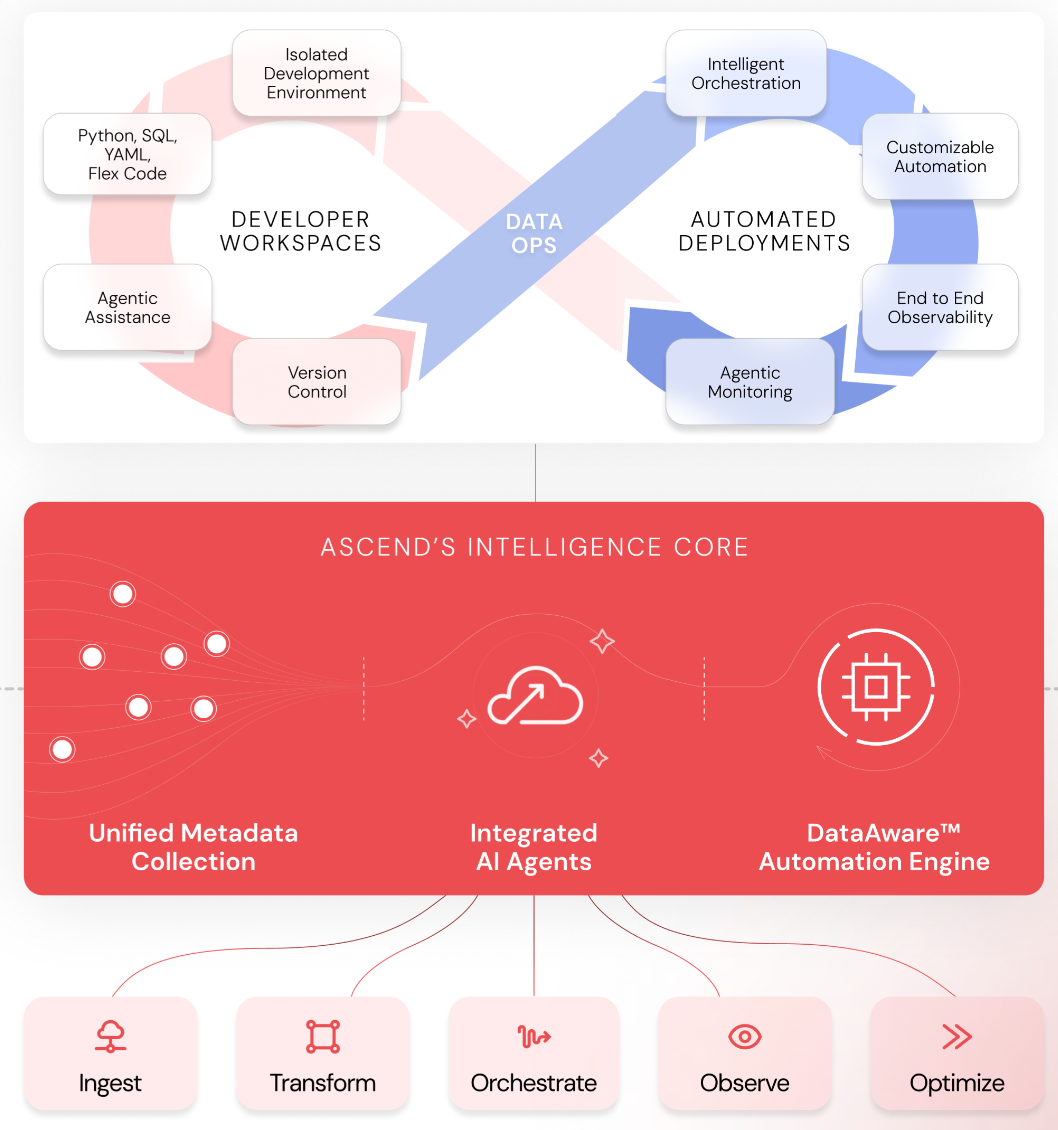
Three architectural capabilities determine whether agentic migration succeeds or fails.
Unified Metadata Across the Pipeline
Your agent is operating blind if your pipeline doesn't surface metadata. Schema information, partition state, data lineage, whether a transformation has already run on a given partition — all of this needs to be accessible to the agent as it reasons about what to build.
This matters for compute efficiency (no reprocessing partitions that are already current), but more importantly it matters for agent effectiveness. An agent that can see the full lineage of a pipeline as it starts translating code makes better decisions than one that's inferring structure from the code alone.
Isolated Developer Workspaces with Real CI/CD
If data engineering has one lesson to borrow from software engineering, it's this: nothing goes to production without a review.
That principle is even more important with agents. The right pattern is:
- Agents have write access to a dedicated developer workspace and a dedicated branch
- All changes are visible in the git diff as they happen
- Nothing moves to production without a human-in-the loop PR process and approval
- Production is read-only — agents can observe it and triage issues from it, but cannot write to it directly
The workflow looks like this: agent detects an anomaly or error in the production observability environment → agent opens a new branch in the dev workspace → agent proposes a fix → agent notifies you (Slack, email, wherever) with the branch and a summary → you review, test, and merge.
That loop — agent detects → agent proposes → human approves → human deploys — is how you get the speed benefits of agentic automation without the risk of silent production errors.
If you don't have CI/CD for your data pipelines today, implement it before you introduce agents. It'll make your team more effective regardless. With agents, it's non-negotiable.
Event-Driven Automation That Closes the Loop
The third capability is what connects metadata and agents into a system that can respond autonomously. Your pipeline runtime needs to emit events — flow runs, component runs, errors, anomalies — and your agents need to be able to subscribe to those events and act on them.
In practice this looks like: a flow run fails in production → the failure event triggers the agent → the agent reads the error logs and the relevant code → the agent opens a branch and starts triaging. You don't have to notice the failure, copy the error into a chat window, and wait for a response. The agent is already working on it.
The same capability powers migration workflows: the agent isn't just executing a task you gave it — it's responding to what it observes in the pipeline as it runs.
The Four-Step Agentic Migration Process
With the foundation in place, the migration process itself is four steps. They're the same steps you'd take manually — the difference is who's doing the work at each stage.
Step 1: Plan Generation and Review
Before the agent writes a single line of code, have it generate a migration plan.
Give it three things:
- Connection to your source data — S3 bucket, database, or an MCP server if your legacy tool exposes one
- The original pipeline code — exported flow definitions from the legacy system (more on format in a moment)
- The original output data — what the legacy pipeline was producing; this becomes the validation baseline
Ask the agent to reason through what ingestion, transformation, and validation will look like in the target system, and to produce a step-by-step plan before it does anything.
Then read it. This is the highest-leverage human touchpoint in the entire process. Five minutes reviewing a migration plan before execution saves hours of cleanup afterward.
A note on the original code format: Many legacy systems export pipeline definitions as XML. Large XML files can consume your entire context window before the agent has done anything useful. Convert to compact JSON first — you can use the agent itself to do this, asking it to extract only the information relevant to the pipeline definition and output it in a structured format.
This keeps context tight, reduces token costs, and produces something you can actually read and sanity-check before handing it back to the agent.
Step 2: Ingestion and Code Translation
Once you've approved the plan, the agent takes over. It ingests the source data, translates the legacy pipeline logic into the target system's constructs, and builds the flow components.
You're not writing this code. You're reviewing it.
This is the hardest mindset shift for engineers who are used to being the ones with their hands on the keyboard. The investment at this stage isn't in the pipeline — it's in programming the agent. The right context, the right guardrails, the right documentation standards upfront mean each subsequent migration requires less of your input. We'll come back to this in step four.
Step 3: Validation
This is the step that separates a migration that works from one that quietly produces wrong answers.
The agent builds a validation flow that does the following:
- Reads the original output from the legacy system
- Reads the output from the newly translated pipeline
- Runs a SQL
EXCEPTin both directions to surface row-level differences - Reads the diff, identifies the source of the discrepancy, adjusts the translated code, reruns
- Repeats until the two outputs are identical
You give the agent one instruction: come back to me when those two tables match.
Common discrepancies the agent will find and fix autonomously: data type differences (legacy tool stored timestamps as strings, target system expects TIMESTAMP), float precision handling, subtle filter logic that wasn't obvious from the code definition alone. These are the kinds of things that would take a human engineer multiple debug cycles to track down. The agent reads the diff rows directly, reasons about what caused the mismatch, and adjusts.
Step 4: Agentic Tuning
This is the step most teams skip, and it's the one with the highest long-term leverage.
As the agent works through early migrations, it will encounter patterns — quirks in how your legacy system handles certain data types, conventions in your team's naming standards, business logic rules that weren't documented anywhere. Those patterns are worth capturing.
The agent should maintain a living set of structured rules it applies to every subsequent migration:
- Learning rules: Patterns discovered during migration (e.g.,
"legacy tool casts all decimal fields as FLOAT64; cast explicitly to NUMERIC on ingest to avoid precision loss") - Business logic rules: Documentation requirements, component naming conventions, README structure
- Documentation rules: How to keep flow READMEs current as components change
Rather than having the agent update rules silently, implement a /learning command that gives you control over what gets captured:
This turns agent learning into a structured, human-approved process. You're not just migrating pipelines — you're building an institutional knowledge base that makes every future migration faster. By the time you're on your tenth pipeline, the agent is applying everything it learned from pipelines one through nine, and it's making fewer corrections with each one.
The Mistakes We've Made (And how to avoid them)
We started too big. The temptation is to hand the agent a large, complex pipeline and see what it does. We did this. The agent made a mess, the context bloated, corrections compounded, and we spent more time fixing than we would have migrating manually. Start with your simplest flow. Use it to tune the agent and build the initial rule set. Then scale.
We let context bloat. Migrations involve a lot of code. Feeding in uncompressed definitions, re-explaining the same constraints across a long thread, not capturing learnings in rules — all of it inflates context, drives up costs, and degrades agent quality over time. Keep context tight. Compress inputs. Capture learnings outside the thread.
We underinvested in agent programming. Engineers' instinct is to write pipelines. The agentic shift is: invest in writing rules and context for your agent, and let the agent write the pipelines. The more you put into agent configuration upfront, the more it pays back across every migration that follows. It took us a few projects to genuinely internalize this.
Where to Start
1. Audit your architecture. Do you have CI/CD for your data pipelines? Isolated dev workspaces? Metadata surfacing through the stack? If not, start there — not just because agents need it, but because your team does too.
2. Pick your simplest pipeline. Not the most important one, not the most representative one. The simplest one. Use it to learn the workflow and start building your agent's rule set.
3. Invest in agent programming before pipeline programming. Write good rules. Capture learnings. The ROI compounds.
Want to see this in action or talk through how it applies to your migration context? Start the conversation with our team.